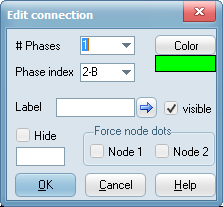
In the Connection dialog you specify the data for a connection. The dialog will automatically pop-up when connecting nodes with a different number of phases. Double click on a connection to show the dialog otherwise. Connection can be drawn by left clicking on nodes or vertical/horizontal connections. In the latter case the new connection will inherit the properties of the existing connection.
Item |
Description |
# Phases: |
This is the number of phases of the connection. Values 1 to 26 are supported. Transpositions can only occure through a 3-phase connection. The number of phases is reflected in the connection thickness and restricted upwards to 3 pixels. A connection with n phases connected to a node of m phases where n<>m will actually connect the first min(n,m) phases. |
Phase index: |
For single phase connections this the phase number actually carried by the connection. Keep the default 0-@ in normal operation and only specify a phase-index for special cases where the connectivity is broken. When connecting a single-phase node and a 3-phase node, the program will specifically ask which phase-index to connect. This does not happen if a connection is moved or the number of phases changes and in this case manual setting of the phase-index is required. Legal values 0 to 26. A connected component will receive it's phase directly from the nearest connection without any test on the phase index of other connections in series. A phase index of 0-@ is automatically overruled by the SPLITTER. |
Color: |
Specify the standard color of the connection. Optionally the Voltage (kV) can also be specified and in this case the Power System colors are used (View|View options/PS colors). |
Label: |
The label shown on screen is as default the phase index. Rotation according to arrow button. |
Visible: |
Check this button to display the label on screen. |
Hide: |
Check this button to hide the connection. It will then effectively be disconnected. Assign Variable>0 to Hide or Hide checked. |
Node dot 1 |
Force node dot on for node 1. Disable the node size effect for this node (see status bar). |
Node dot 2 |
Force node dot on for node 2. |
kV Applies only to 3-phase connections. Set to something different from zero to apply the View|Options/PS Color options. |
|